
New Literacy Tools: Opening Doors for Every Learner

Several exciting new literacy resources are making it easier for emergent readers and writers with complex support needs to participate actively in instruction. The new Learning Letters, Learning Letters Plus, and Learning Words Daily Routine tools from Building Wings, along with Kate Ahern’s ALT: Accessible Letters Tool and WonderWall Topic Word Generator, offer practical ways to make literacy instruction more accessible, engaging, and meaningful.
These tools are helpful for educators, families, occupational therapists, speech-language pathologists, assistive technology specialists, and anyone supporting learners who use augmentative and alternative communication, or AAC.
Building a Path from Letters to Words
In July 2026, Building Wings released new digital Daily Routines resources for Learning Letters, Learning Letters Plus, and Learning Words within Readtopia and ReadtopiaGO. These interactive resources turn familiar instructional routines into digitally manipulable lessons that are easy to display on an interactive whiteboard, share during virtual instruction, or use with an individual learner on a computer or tablet.
Instead of relying only on printed materials or physical letter tiles, educators and learners can interact with letters, sounds, and words directly on the screen. Letters can be moved, combined, changed, and examined as learners participate in activities such as identifying letters, connecting letters with sounds, blending sounds, building words, decoding, and spelling.
These tools are much more than engaging digital activities. Learning Letters, Learning Letters Plus, and Learning Words form a systematic, sequential approach to phonics instruction. Skills are introduced in an intentional order, taught explicitly, practiced frequently, and applied to increasingly complex reading and spelling tasks.
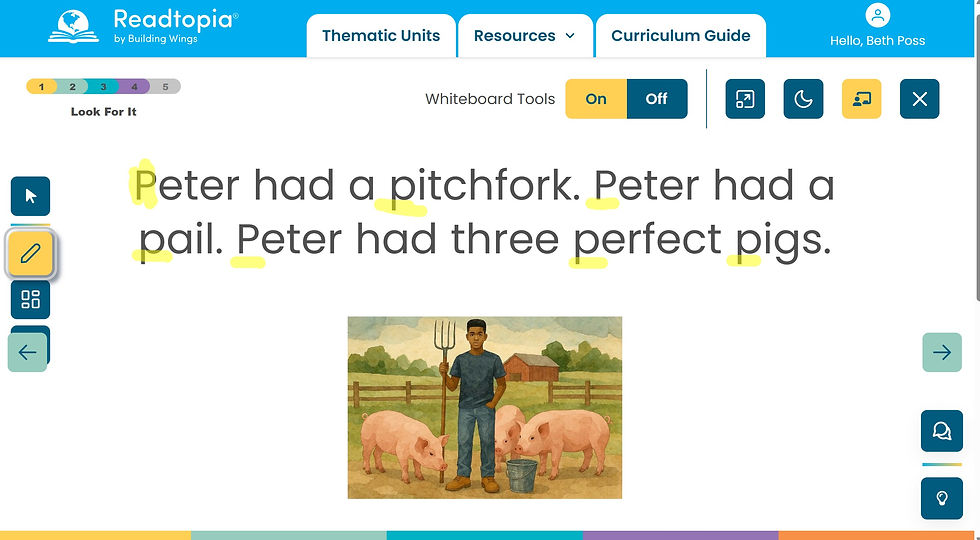
Learning Letters develops alphabet knowledge, letter-sound connections, letter formation, and phonological awareness. Learning Letters Plus helps learners move from recognizing individual letters and sounds to blending, building, and decoding words. Learning Words extends this learning through more advanced phonics patterns, word study, spelling, and reading practice. Building Wings describes these brief daily routines as a way to provide explicit instruction in alphabet knowledge, phonemic awareness, phonics, decoding, and word study for learners with complex needs.
The interactive Daily Routines support instruction aligned with both the science of learning and the science of reading. Predictable lesson structures can reduce the effort required to understand what will happen next, while repeated practice helps learners strengthen and retain new skills. The digital activities encourage active participation rather than passive observation and allow educators to provide immediate modeling, feedback, and additional practice.
Just as importantly, learners are not required to say letters, sounds, or words aloud to take part. A learner can demonstrate knowledge by choosing a letter with AAC, using a switch to scan through options, directing an adult to move a tile, looking toward a choice, or using another established response.
ALT Makes Word Work More Accessible
Kate Ahern’s ALT: Accessible Letters Tool, available through AAC Voices, provides a flexible digital word-work board designed for learners with a wide range of physical, visual, auditory, attentional, and access needs.

ALT includes options for:
Direct selection with a touchscreen or mouse
Joystick access
Dwell selection for learners using head tracking or eye gaze
Single-switch scanning
Dual-switch scanning
Auditory supports
Visual customization
These options make it possible for more learners to manipulate letters, construct words, and participate in phonics lessons themselves rather than watching an adult complete the activity for them.
ALT is not tied to only one curriculum. It can support word-building activities from many systematic, sequential phonics programs. For example, an educator using the UFLI Foundations scope and sequence could enter or display the letters needed for a particular lesson and use ALT for blending, word chains, decoding, and spelling practice.
Visual Access Is Literacy Access
Many learners benefit when visual materials are simplified and customized. A standard white screen filled with small black letters may be difficult or tiring to process. Some learners see letters more clearly when they are presented:

In a larger size
With increased spacing
On a dark or black background
In bright, high-contrast colors
With fewer choices visible at one time
Without unnecessary animations or visual clutter
The Daily Routines from Building Wings include accessibility features such as dark mode, controlled animations, and visual supports. ALT also offers visual accommodations that can help educators match the display to an individual learner’s needs.
These are not merely cosmetic preferences. When the visual presentation is accessible, the learner can devote more energy to the actual literacy task: noticing letters, connecting sounds, building words, and communicating ideas.
WonderWall Helps Writers Find Their Words
Learning to write involves much more than handwriting or spelling. Writers also need ideas and vocabulary.
That can be challenging for learners who have strong interests and plenty to share but have difficulty independently generating or retrieving the words they want. A learner may know that they want to write about trains, weather, dogs, space, cooking, elevators, or a favorite movie but become stuck when asked, “What words could you use?”

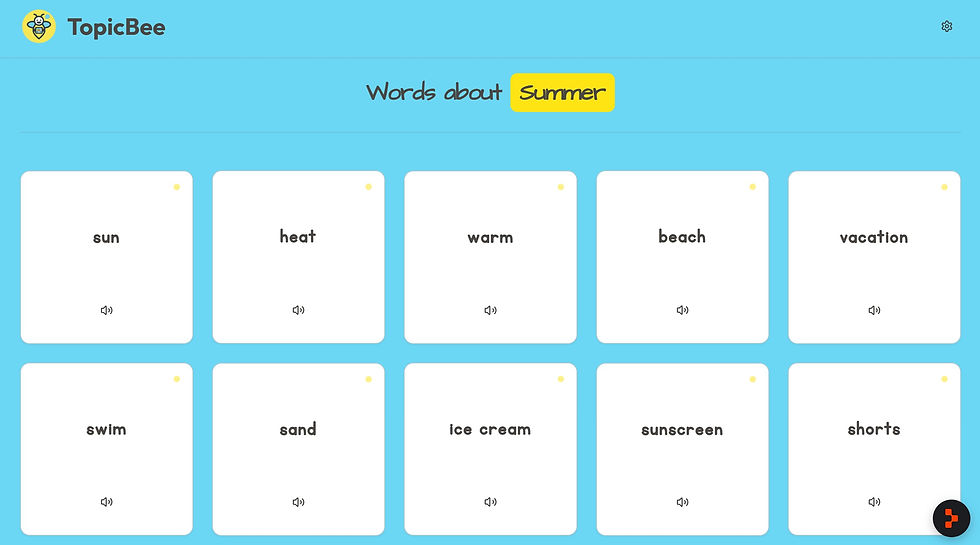
The WonderWall Topic Word Generator from AAC Voices offers a simple and inviting solution. Enter a topic, and WonderWall generates a collection of related words. Learners can click a word to hear it spoken or hear its spelling. The words can support brainstorming, vocabulary development, spelling, and writing. (AAC Voices)
For example, a learner who loves sharks may have many ideas but need help accessing words such as ocean, fin, teeth, swim, predator, or reef. WonderWall can provide a starting point without taking over the writing process. The learner still chooses which words matter, what they want to say, and how they want to express it.
The most powerful aspect of these tools isn't the technology itself—it's what it makes possible. These resources lower barriers, allowing learners to demonstrate their curiosity and potential. Whether in the classroom, during therapy, or at home, these tools ensure that every learner can move from a passive observer to an active, confident reader and writer.


Comments